

AI and BIM automation are changing structural engineering delivery, but not in the simplistic way often suggested online. Small and medium-sized UK consultancies are not about to replace senior engineers with algorithms. What is happening is more practical: repetitive modelling, checking, scheduling, sheet production and coordination tasks are becoming easier to automate, while engineering judgement remains essential.
For directors, BIM managers and senior engineers, the question is not whether technology matters. It is where automation can genuinely reduce delivery time without weakening quality control, design responsibility or client trust.
This guide explains AI BIM automation structural engineering in plain language. It covers where UK consultancies are today, which AI and BIM automation workflows are already useful, what still needs human judgement, and how firms can experiment without buying every tool or building an internal automation team from scratch.
Contents
- Where we are today: the state of play in UK consultancies
- AI applications already delivering value
- What this means for small and medium consultancies
- The human engineer is still essential
- Preparing your firm for the next five years
- Workflow diagram
- Talk to Xponexus Engineering
Where We Are Today: The State of Play in UK Consultancies
BIM as standard, not novelty
BIM is no longer a novelty for many UK practices. Revit models, federated coordination, COBie-style information requirements, common data environments and structured information exchange are part of normal delivery on many public-sector, commercial and multidisciplinary projects.
For structural engineering consultancies, BIM is often less about visual sophistication and more about coordination discipline: grids, levels, structural framing, linked models, drawing extraction, schedules, revisions and clash response. The model becomes a project information container, not just a 3D representation.
Cloud collaboration now normal
Cloud collaboration has made remote BIM work far more practical. Tools such as Autodesk Construction Cloud, BIM 360 and Autodesk Forma, along with other Common Data Environment workflows, allow teams to manage models, drawings, issues and revisions without everyone working in the same office.
The UK BIM Framework and ISO 19650 guidance emphasise information management, including naming, status, revision control and CDE workflows. These principles matter even more when teams are remote because they prevent the wrong model, drawing or issue status being used.
AI adoption still patchy outside large firms
AI adoption is less consistent than BIM adoption. Large firms may have internal digital teams, data specialists and automation leads. Smaller consultancies usually have less time to experiment because every hour spent developing a workflow is an hour not spent delivering fee-earning work.
This creates a gap. Smaller firms can see the value of automation, but may struggle to justify licences, training and internal development. That is where remote partners with existing BIM automation capability can help firms leapfrog without carrying the entire cost themselves.
AI Applications That Are Already Delivering Value
The most useful applications today are not fully autonomous structural design. They are targeted workflows that reduce repetitive work and improve coordination. The best automation amplifies engineers and BIM teams rather than replacing them.
Automated clash detection and model coordination
Clash detection is one of the clearest BIM automation use cases. Tools such as Navisworks, Solibri and CDE issue workflows can help identify conflicts between structural, architectural and MEP models. Automation can group issues, identify repeated clashes and support coordination meetings.
The engineer still decides what matters. Not every clash has equal priority. Some are model hygiene issues. Some reveal genuine construction conflicts. Some require redesign. Automation helps find and organise issues, but judgement decides how they are resolved.
Generative design for scheme optimisation
Generative design means using software to explore multiple design options based on rules, constraints and performance goals. Autodesk’s Forma, evolved from Spacemaker, is an example of AI-assisted early-stage planning and design analysis, helping teams evaluate factors such as wind, sun, noise and site conditions.
For structural engineering, generative thinking can support option studies: grid alternatives, member layouts, rationalised bay sizes, material comparisons and buildability constraints. It does not replace structural concept design, but it can help teams test more options earlier.
Automated quantity take-off and cost estimation
When BIM models are structured properly, schedules and quantities can be extracted more consistently. This can support early cost planning, material comparisons and carbon discussions. The limitation is model quality. Automated quantity take-off is only as reliable as the information in the model.
For small consultancies, the practical first step is not complex AI costing. It is standardising parameters, families and schedules so quantities can be extracted with less manual clean-up.
Predictive analytics for project scheduling
Predictive AI BIM is still developing in day-to-day SME consultancy practice, but the direction is clear. Better project data can help identify likely delays, coordination risks, drawing bottlenecks and resource pinch points.
In the short term, many firms can gain value from simpler analytics: model issue counts, drawing revision frequency, time spent on repetitive tasks, coordination comment trends and turnaround times. These data points can reveal where automation or remote support will have the greatest impact.
Automation Revit: Dynamo scripting and Python API workflows
Dynamo for Revit is a visual programming environment that allows teams to customise BIM workflows. It can support tasks such as sheet creation, parameter updates, family checks, view setup, model data extraction and repetitive geometry operations. More advanced teams may use Python nodes, Revit macros or Revit API workflows for deeper automation.
For a structural team, practical scripts might create drawing sheets from a schedule, check naming conventions, populate shared parameters, automate repetitive detail setup, or flag missing information before issue. These are not glamorous AI use cases, but they save real delivery time.
What This Means for Small and Medium Consultancies
The risk of falling behind
Firms that ignore automation may remain competitive for a while, especially on smaller projects. But over time, clients and collaborators will expect faster coordination, cleaner information, fewer avoidable drawing errors and better digital delivery.
The risk is not that a competitor has “AI”. The risk is that a competitor can produce coordinated sheets faster, respond to model changes more efficiently and use senior engineers for judgement rather than repetitive production.
The opportunity to leapfrog via remote partners
Smaller consultancies do not need to build every automation capability internally. A remote BIM partner that already uses Dynamo scripts, parametric modelling and model QA routines can bring those efficiencies into the workflow without the client buying every tool or training every employee.
This is not about outsourcing strategic thinking. It is about accessing production systems that make delivery faster while the client retains design responsibility and approval.
The Human Engineer Is Still Essential
Judgement, client relationships and regulatory navigation
AI structural calculations are a sensitive topic because structural design carries professional responsibility. Software can calculate, optimise and flag issues, but it does not carry the human judgement required to understand site constraints, client priorities, construction sequence, Building Control expectations, CDM duties or design risk.
Clients do not only buy output. They buy confidence. Senior engineers explain decisions, manage uncertainty, coordinate with other consultants and take responsibility for final review. AI cannot replace that relationship.
AI as amplifier, not replacement
The credible position is that AI and BIM automation are amplifiers. They can speed up repetitive work, improve consistency, reduce manual errors and help engineers test options. They should not be treated as a substitute for competent engineering review.
This is especially true for small UK consultancies, where reputation depends on practical judgement and reliable delivery. Automation should make the engineer more effective, not remove the engineer from the process.
Preparing Your Firm for the Next Five Years
The best way to prepare is to start with repeatable pain points, not with technology for its own sake. Ask where your team loses time every week. Sheet setup? Model warnings? Shared parameters? Drawing issue packs? Repeated details? Clash comments? Manual schedules?
Then choose one low-risk workflow to improve. Document the current time, test a script or automated routine, review the output and decide whether it is worth standardising. This creates a practical automation roadmap rather than a vague AI strategy.
| Workflow | Automation opportunity | Human review still needed |
|---|---|---|
| Sheet production | Automated sheet/view creation | Drawing completeness and presentation |
| Model QA | Warnings, naming and parameter checks | Engineering relevance of issues |
| Clash response | Issue grouping and tracking | Design decision and coordination priority |
| Schedules | Parameter-driven extraction | Quantity sense check and scope alignment |
| Family creation | Reusable parametric families | Project suitability and standards approval |
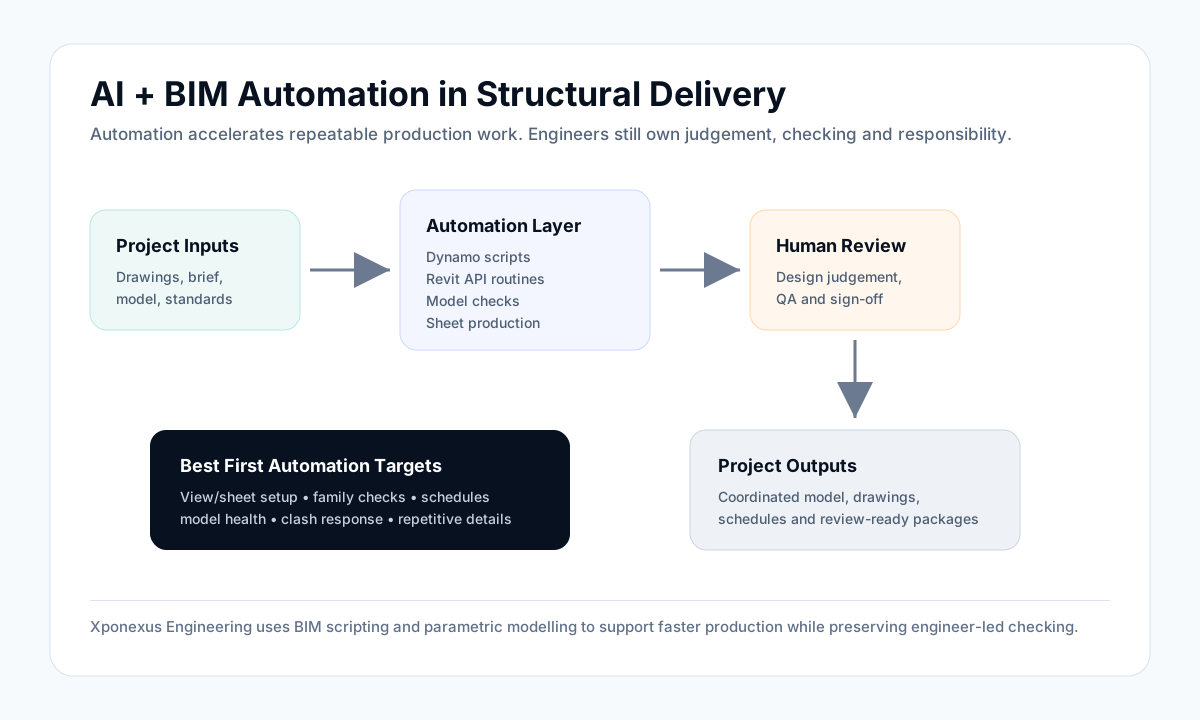
Workflow Diagram
The diagram below shows a practical AI and BIM automation workflow for structural engineering delivery.
Talk to Xponexus Engineering
Xponexus Engineering invests in automation and BIM scripting so clients do not have to build every workflow internally. Our teams use Dynamo scripts and parametric modelling to speed up sheet production, model checks, family creation and repetitive drawing workflows, helping projects move faster without the client buying new software or training an internal automation team from scratch.
We still keep engineering judgement at the centre. Automation supports production. Your senior engineers retain design responsibility, review and final approval.
Curious how automation could cut delivery time on your next project? Ask us for a sample workflow showing how we use BIM scripting to accelerate drawing production.
FAQs
Will AI replace structural engineers?
No. AI and automation can support repetitive production and analysis tasks, but structural judgement, professional responsibility, client communication and regulatory interpretation still require competent engineers.
What BIM tasks can be automated today?
Common examples include sheet creation, view setup, parameter checking, schedule extraction, model health checks, family routines, clash issue tracking and repetitive drawing production.
What is generative design in structural engineering?
Generative design uses rules, constraints and performance goals to explore multiple design options. In structural work, it can help compare schemes, grids, material options and layouts, but it still requires engineer-led interpretation.
Can small consultancies use AI without major investment?
Yes. Start with low-risk automation such as Revit scripts, model QA routines and standardised schedules. A remote partner can also provide access to existing automation workflows without the consultancy carrying all software and training costs.
How does Xponexus use BIM automation?
Xponexus uses BIM scripting, Dynamo-style workflows and parametric modelling to support faster sheet production, model checks, family setup and repetitive documentation tasks while keeping engineer review in place.
Suggested Internal Links
- Remote Engineering Support
- Civil, Structural, CAD and BIM Services
- BIM and Revit Modelling Support for UK Consultancies
- Why Senior Engineers Are Losing Time to Drafting and Modelling
- Contact Xponexus Engineering
Sources
- Autodesk, introducing Forma as the evolution of Spacemaker: https://blogs.autodesk.com/forma/2023/05/08/autodesk-introduces-forma-the-next-evolution-of-spacemaker/
- Autodesk Help, Dynamo for Revit: https://help.autodesk.com/cloudhelp/2022/ENU/RevitDynamo/files/RevitDynamo_Dynamo_for_Revit_html.html
- Autodesk Platform Services, Automation APIs: https://aps.autodesk.com/automation-apis
- UK BIM Framework / Global BIM Network, ISO 19650 guidance: https://globalbim.org/info-collection/information-management-according-to-bs-en-iso-19650-guidance-part-1-concepts/
- NBS, Common Data Environments: https://www.thenbs.com/knowledge/common-data-environments
- Pexels image by ThisIsEngineering, “Engineer Working in Office”: https://www.pexels.com/photo/engineer-working-in-office-19895882/
- Pexels licence: https://www.pexels.com/license/
Leave a Reply